Inov8 Mudtalon Speed V2 Fell Running Shoes

Autumn 2025 saw the release of the Inov8 Mudtalon Speed V2 fell running shoes.

I’ve had a pair of Inov8 Mudtalon Speed fell running shoes for around 18 months and have used them for racing and training in wet and muddy conditions so I was interested to take a look at the updated version when they were released in October 2025. A very wet couple of months gave me a chance to test them out in the Peak District in conditions that they were designed for.

Mudtalon Speed V2

Inov8 Mudtalon Speed V2

Features – What’s new with version 2?

Visually there is very little difference between the original and version 2; the same lightweight upper material, the same aggressive sole with 8mm lugs and the wider toe box to allow the toes to splay out. As before the shoes are available in two width fittings – Precision and Wide (I chose the narrower option) and the shoes come with the Boomerang cushioned footbed. The stack height is 11mm heel to 7mm midfoot giving a racy 4mm drop.

photo showing drop heights of Mudtalon and Mudtalon Speed

6mm drop on the Mudtalon (left) 4mm drop on the Mudtalon Speed

As with the original version the Mudtalon Speed V2 are a very flexible shoe (I found this to be the main difference between the Mudtalon Speed and the Mudtalon which are noticeably stiffer – see video at the end for a comparison). The low drop and high ground feel result in a shoe that is great for fast running over uneven terrain.

a very flexible shoe

a very flexible shoe

The main upgrades on the V2 are:

Better drainage with each shoe having 4 drainage holes in the upper, which allows water to escape very quickly reducing that feeling of running with lead boots immediately after crossing a stream! Not that the original version were slow draining, the upper material allows water to drain freely.

photo of Mudtalon Speed upper with drainage holes

drain holes in the uppers

The uppers now have a stripped down tongue with less padding than previously, which makes it a little less comfortable but less prone to soaking up water. Also the shape of the upper at the midfoot is slightly different (It took me a while to notice the difference!) which is supposedly to improve the “lockdown” when the laces are tightened.
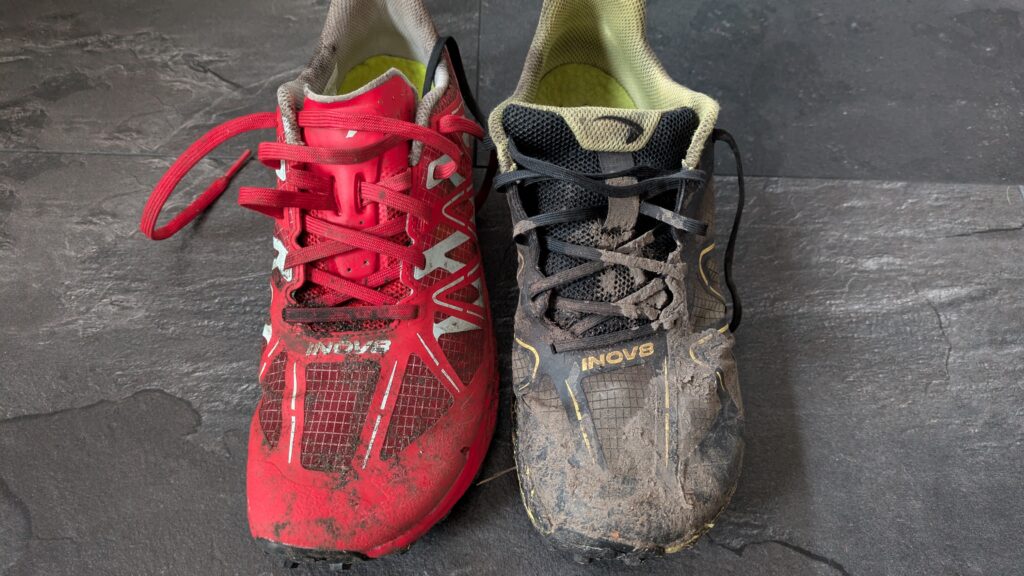
side by side Mudtalon Speed V2 and V1

spot the difference? V2 red V1 yellow

The STICKYGRIP™ rubber outsole now has an updated formula that is now said to offer a 36% improvement in grip in wet conditions. Details of the testing can be seen here: SATRA lab test: https://new.satra.com/markets/footwear/

I can’t honestly say that I noticed any improvement in grip when running on wet rock compared to the original version, they aren’t bad and I managed a few “leaps of faith” without falling over! However I haven’t found any shoe where you don’t need to exercise a bit of caution when running quickly over smooth wet or lichen covered rock!

runner jumping between rocks over a stream

leap of faith – the wet rock test!

The midsole uses a Powerflow foam that is slightly firmer and thus more hardwearing than on the version 1, again I couldn’t really tell the difference (although my version 1 have now done 700km so it isn’t possible to compare like for like). I know some runners who had the original version and didn’t get much use out of them before the upper material began to fail. Personally I didn’t experience that, I’ve done 800km and there is still plenty of life left in them. As always it will be interesting to see how the new version stand up to the rigors of use in harsh conditions.

When would I use these shoes?

Like their predecessors the Mudtalon Speed V2 are a low drop, flexible, lightweight fell running shoe. They are fast draining and give excellent grip in mud, on wet grass and on steep fell terrain. I see them as a shoe for short, fast races in wet conditions and for faster training sessions on technical terrain. For winter training and for longer, slower races or challenges such as the Bob Graham Round I’d opt for the plain Mudtalons (not the Mudtalon Speed) which are stiffer, have a 6mm drop, more padding and slightly more cushioning (see video comparison). Inov8 also offer a Mudtalon Zero which as the name implies has no differential between midfoot and heel height.

close up of running through mud

designed for these conditions

Technical info:

Weight average 260g (220g on my scales for my size 6.5). Drop 4mm. Lug depth 8mm.
Sole – STICKYGRIP™, Boomerang footbed. Two widths; Precision Fit & Wide Fit.
Vegan friendly!

RRP – £130
Available on the Inov8 website:
Link to Inov8 website 

Video comparing the Mudtalon and Mudtalon Speed V2

If you found this review useful you can buy me a coffee to show your appreciation!

Ron Hill Reverence fell running shoes – 1000km review

I’ve covered 1000km in my Ron Hill Reverence fell shoes and am impressed with how well they have stood up to the harsh conditions they have been used in.

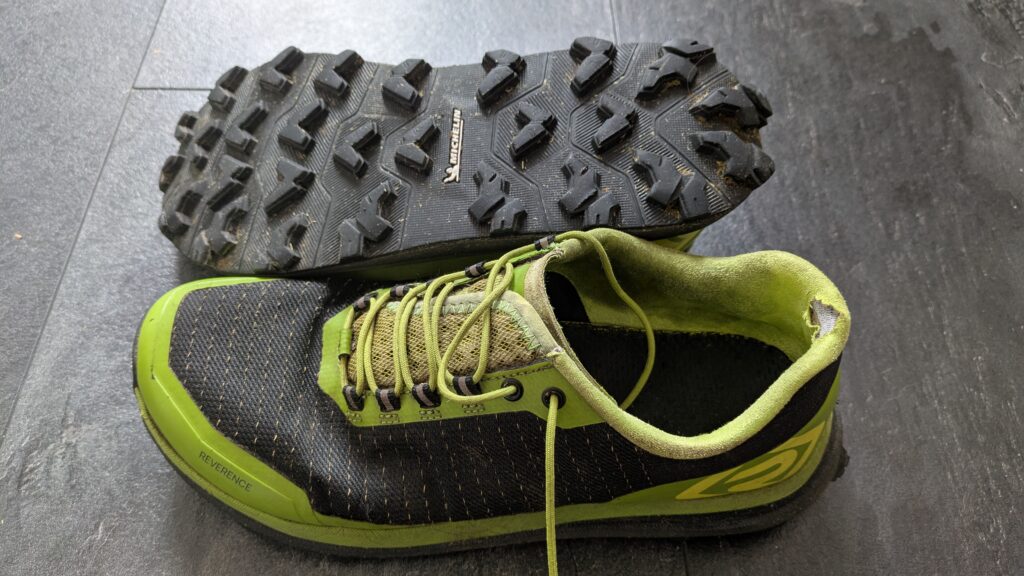
I generally don’t expect to get more than 800km out of a pair of fell running shoes. The harsh terrain and acidic soil takes its toll, usually on the uppers which often split or fail at the seams. Some shoes last a little longer, others are worn out by five hundred kilometres. My Reverence shoes by Ron Hill have now clocked one thousand kilometres and other than some wear on the heel cup they are in good condition. The heel cup wear is probably due to me not slackening the laces sufficiently whilst taking the shoes on and off.

Ron Hill Reverence fell running shoe

1000km wear

I’ve used the shoes mainly for training (I prefer a lighter, more flexible shoe for racing) and also for hiking including a multi day backpacking trip. The treads show only a little sign of wear and the Matryx upper fabric is still in good condition. I’d recommend them as a durable shoe for long term use.

The video below gives a close look at the shoes after 1000km of use.

If you found this review useful you can buy me a coffee to show your appreciation!

Nitecore UT27 Multiple Colour Temperature Headtorch

New for 2025 Nitecore’s latest trail running head torch the updated UT27, now utilising MTC (Multiple Colour Temperature) technology

I’m a fan of Nitecore head torches and have been using the NU25 on a regular basis so I was interested to take a look at the updated UT27 released in September 2025.  As with the previous version it offers three brightness settings: 100 lumens, 280 lumens and 500 lumens, plus a turbo mode of 800 lumens for when you need a short blast of very bright light. This certainly makes it a good choice for fell running on rough ground and remote terrain.

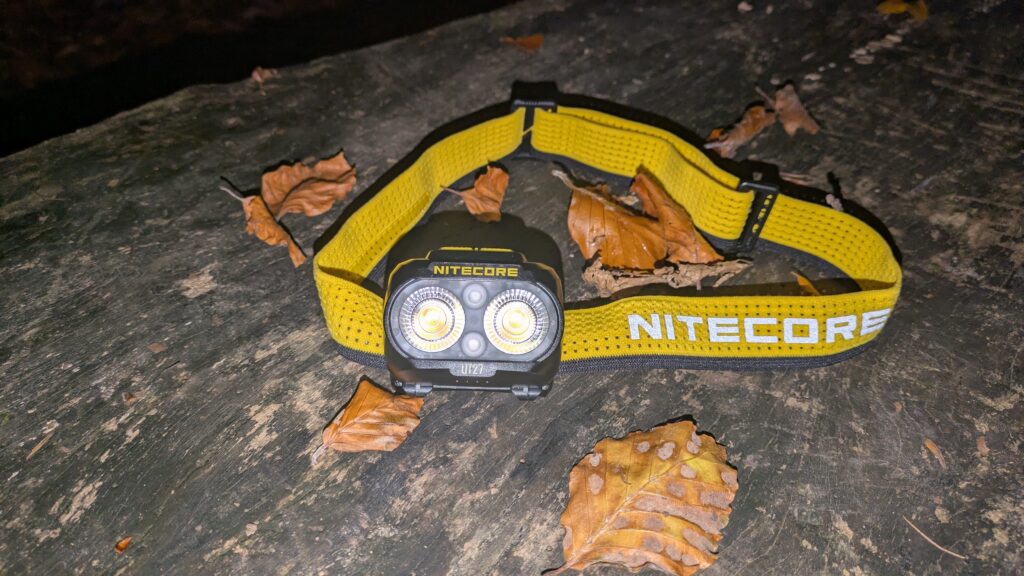
Nitecore UT27 MCT head torch on a log

Nitecore UT27 MCT head torch

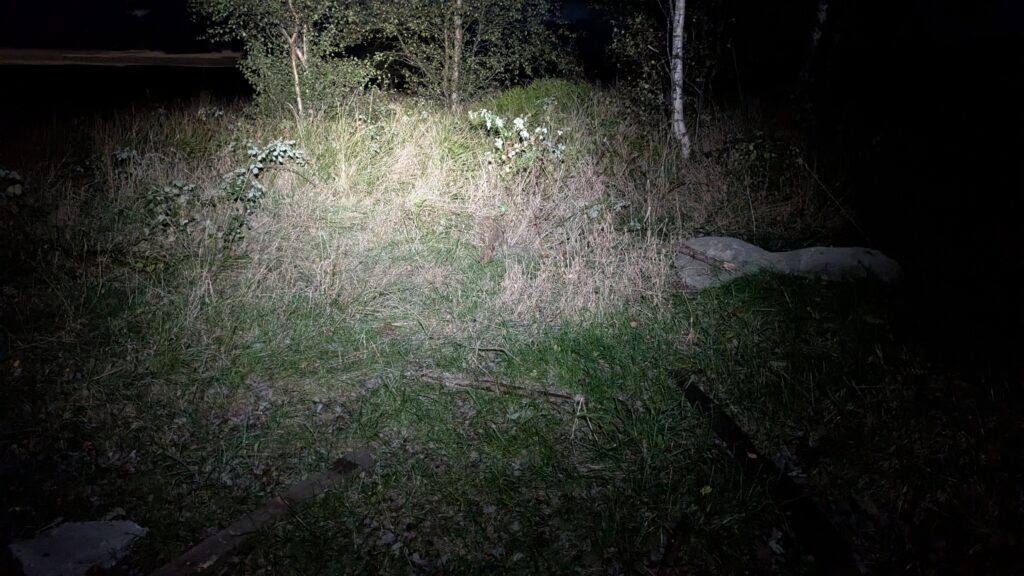
The main updated feature is the ability to switch between three colour temperatures: Cool White Light, Neutral White Light and Warm Light. The best way to describe these is the cool white gives a harsher white light, the warm light a softer, slightly yellow light and the neutral white is somewhere between the two.

Why? Good question! Nitecore claim that the different colour temperatures (technically known as CRI Colour Rendering Index) are best suited to different situations and weather conditions. The warm light is more effective in damp conditions such as rain, drizzle, snow and fog where the moisture in the air scatters the light. It is claimed that a warm light penetrates more effectively and helps you judge distance rather than being reflected back towards you. In better weather conditions a cooler light would be more useful. The advantage of a cooler white light is that it gives a perception of higher brightness so can be used on a lower power setting, thus preserving battery life.

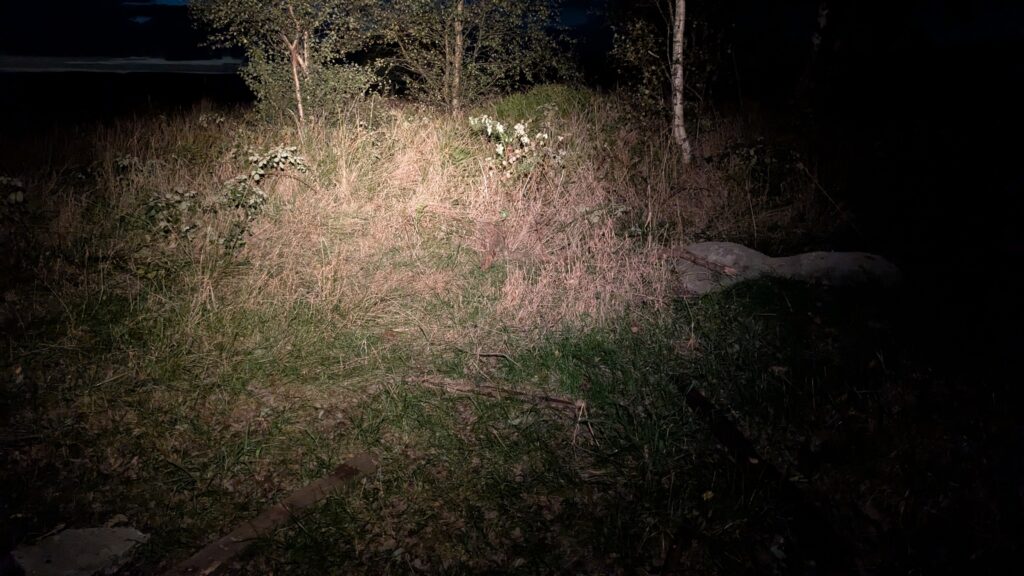
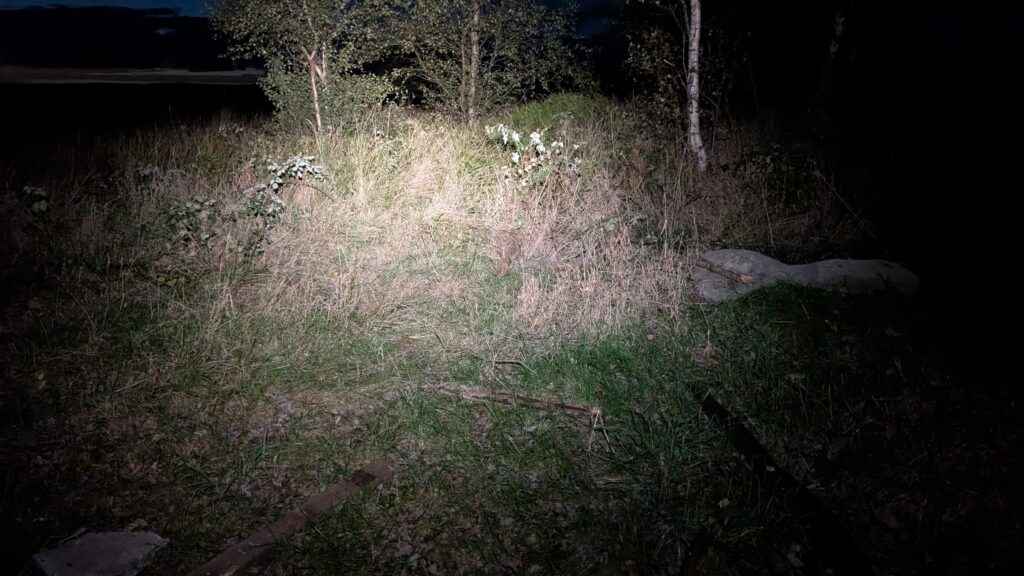
Different colour temperature settings also alter the appearance of how colours appear compared to in daylight. A CRI of 100 is how colours would appear in sunlight, so the higher the CRI the more realistic the colour. This can help with identifying objects for example vegetation, tree roots, rocks and branches. See the 3 photos below:

light pattern 280L warm light setting

warm light 280 lumens (CRI 97)

light pattern 280L neutral white setting

neutral light 280 lumens (CRI 83)

light pattern 280L cool white setting

cool white 280 lumens (CRI 73)

In use:

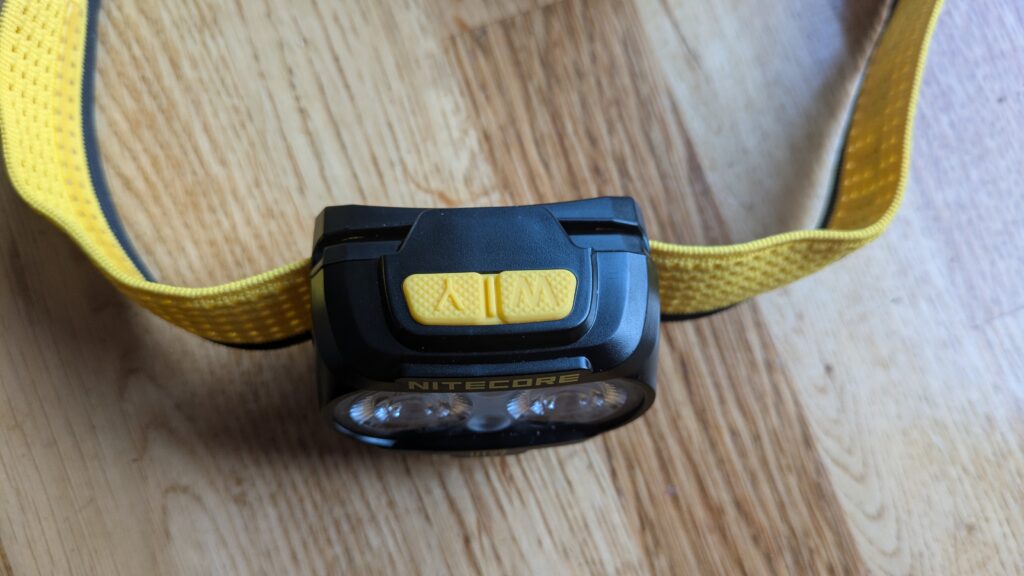
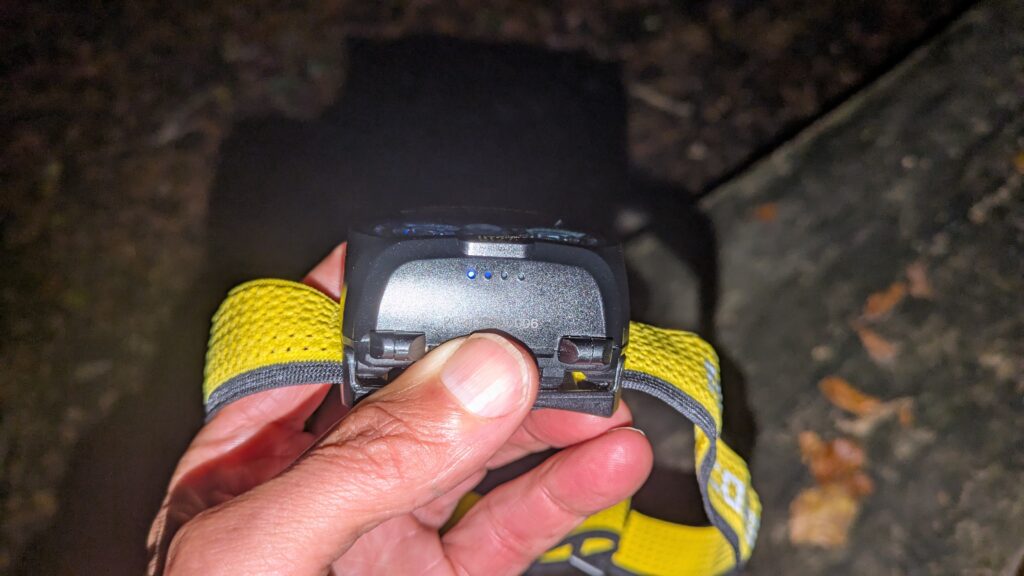
The UT27 is very easy to use, having two buttons the left of which operates the cool and neutral white lights, the right button the warm light. A single press scrolls through the 3 brightness settings. It is slightly more tricky switching between the 2 white light settings as it requires a couple of presses (short then long press) of the left button. The buttons are conveniently marked W and Y (white and yellow?) Steady and flashing red modes are also available. Four tiny blue lights on the underside of the torch indicate remaining battery life.

Nitecore UT27 top view

easy to use buttons

photo of Nitecore UT27 battery indicator

battery power indicators

At 74g the torch is light enough for extended wear without being uncomfortable and neither does it bounce around when running at a fast pace. The hinge allows a wide range of angles whilst the wide, stretchy headband with reflective decals is easily adjustable and can be detached from the torch for washing. The torch also has a slightly glow-in-the-dark appearance which is useful if you turn it off then want to find it again in the dark (which I found handy when using it in my tent)

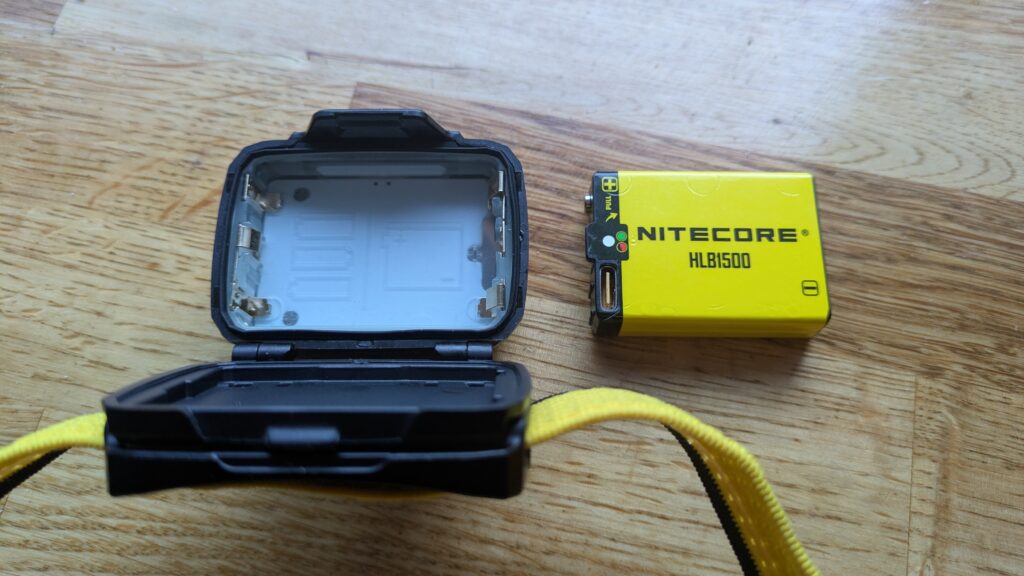
The removeable Li-ion battery is USB-C rechargeable although you do need to open the back of the torch to access the charging port which is a little tricky. The ability to also use 3 x AAA batteries could be a useful feature if for some reason you are unable to recharge the Li-ion one. Battery life is claimed to be 14h 30min on low (100L), 6h 30min on medium (280L) and 3h 30min on high (500L) however I haven’t had chance yet to fully drain the battery from full.

HLB1500 rechargeable Li-ion battery

Rechargeable 1500mAh Li-ion battery or 3 x AAA

The torch comes supplied with instructions, USB C to C charging cable and a handy stuff sack that also acts as a light diffuser. There is also a plastic clip so that the torch can be attached elsewhere, for example to a backpack for cycling.

Statistics

Battery:

HLB1500 Li-ion battery charged via an external USB-C port. Also takes 3 x AAA batteries but with slightly reduced run time

Weight:

74g

RRP:

£65

Waterproof Rating:

IP66

My Verdict:

The Nitecore UT27 MCT is a good, lightweight head torch that is well suited for trail and fell running for extended periods. It is easy to operate even with thin gloves and the ability to use AAA batteries makes it a versatile choice. As for the Multiple Colour Temperatures, I find it an interesting feature. I can certainly tell the difference between the cool and warm settings although I can’t honestly say that either make it easier to see the terrain. I haven’t yet used the torch in heavy rain or fog so can’t say if the warm light feels more effective at cutting through the reflected glare.

Overall I think it is a good torch, overkill for camping or backpacking (I use the NU25) but great for running on technical terrain and night navigation. I can’t honestly say that the Multiple Colour Temperature feature is a game changer for me. Time will tell.

Video showing features:

If you found this review useful you can buy me a coffee to show your appreciation!

Inov8 Mudtalon Speed – first impressions

The Mudtalon Speed is the latest fell running shoe from Inov8. As its name implies it is designed for fast paced running in muddy terrain. I’ve had a few runs in them, here are my first impressions.

Inov8 have built a reputation for trail and fell running shoes that are designed for the muddiest of conditions. The Mudclaw and X-Talon models have become established favourites of many fell runners, particularly in the UK. Their new offering, the Mudtalon Speed, is designed to combine the best of both shoes.

photo of Inov8 Mudtalon Speed shoes

Inov8 Mudtalon Speed shoes

Features

The first noticeable feature when looking at the Mudtalon is the upper material. They are constructed of a very lightweight ripstop fabric which is almost see through.

Inov8 Mudtalon ripstop upper

see through shoes?

This drains water very effectively and unlike other fabrics the uppers are unlikely to absorb water as the water repellent treatment wears off. How well the uppers stand up to wear and tear remains to be seen. The shoes are extremely flexible although they do have a flexible rock plate under the forefoot to offer protection when running on rocky ground.

photo showing flexibility of Inov8 Mudtalon Speed

they flex!

The toe also has a sturdy bumper to protect against kicking rocks. As with both the Mudclaw and the X-Talon the Mudtalon has an aggressive outsole with 8mm deep lugs. However the shape of the lugs are different, being more of a chevron rather than pyramid shape. The outsole features Inov8’s STICKYGRIP™ rubber compound which gives a better grip on wet rock than some of the harder compounds. The trade off is that the softer rubber wears more quickly so you’d be advised to avoid running on hard terrain if you want the studs to last!

photo of underside of  Mudclaw, MudTalon and X-Talon shoes

stud pattern L – R Mudclaw, MudTalon, X-Talon

photo of  Mudclaw, MudTalon and X-Talon shoes

top view of same shoes

Looking at the Mudtalon it is more anatomically shaped in the forefoot than either the Mudclaw or X-Talon, widening at the toes to give a more natural fit. An interesting feature is that the Mudtalon is available in two width fittings; Precise and Wide. This will please a lot of people who have previously been put off buying a shoe because although it fits length ways it is either too narrow or too wide. (I think it would be great if all shoes were available in different widths as well as lengths).

The heel cup is noticeably higher at the back than on some of the Mudclaw and X-Talon models, possibly to allow the heel to be locked in securely. I did notice this whilst running down steep ground and having struggled with achilles tendonitis in the past I’m wary of any shoes that aggravate the condition. I’ll have to take note of any adverse symptoms after wearing them.

photo of Inov8 Mudtalon heel cup

shape of heel cup – achilles aggravator?

Despite being designed for running predominantly on soft ground the Mudtalon still offers a degree of cushioning, coming with Inov8’s Boomerang cushioned insole and a Powerflow Pro midsole. The midsole has a depth of 7mm at the forefoot and 22mm at the heel. Stack height is 26mm / 22mm heel to forefoot giving a 4mm “drop”. This comparatively low drop lends the shoe to fast running and racing.

running through mud wearing Inov8 Mudtalon Speed

they are designed for mud!

Technical info:

Weight average 260g (213g UK 6.5 on my scales). Drop 4mm. Lug depth 8mm. Sole – STICKYGRIP™. Two widths; Precision Fit & Wide Fit.

RRP

£130

Overall impression:

The new Inov8 Mudtalon Speed feel lightweight and flexible and their 4mm drop gives them a “racy” feel. The upper material drains water very quickly making them an ideal shoe for winter running as well as racing on soft terrain. The design seems to hit the middle ground; lighter than the Mudclaw with a bit more grip than the X-Talon. You might argue that runners already had sufficient choice with Inov8’s existing models. What I do think runners will welcome is the choice of width fittings – no more avoiding a shoe because it is too narrow or too tight. As with all running shoes, the true test isn’t what they are like straight out of the box it is how well they stand up to wear and tear –  watch this space!

Video giving a closer look at the Mudtalon Speed

Link to men’s version https://tidd.ly/3Oj3RHw

Link to women’s version https://tidd.ly/492YynL

If you found this review useful you can buy me a coffee to show your appreciation!

Coros Optical Heart Rate Monitor Strap Test

Optical heart rate monitors on the back of watches are known to be unreliable. I wanted to see how the optical, strap sensor from Coros performed when compared to a chest strap heart rate monitor.

I’ve recorded my heart rate whilst training for well over 15 years. I’ve experimented with wrist based sensors but found them to be extremely unreliable compared to a chest strap so for the vast majority of my runs I have used a chest strap. I’m currently using the Garmin Run strap paired with a Garmin Fenix 5 watch.

I’d heard that optical sensors worn on your arm tended to be more accurate than wrist sensors so I thought I’d check out the claims. The Coros heart rate monitor strap still uses an optical sensor but it is designed to be worn on the forearm or upper arm.

Coros optical HRM strap

The Test

In this experiment I went for a run whilst wearing two watches, each one recording heart rate independently of the other. On my right wrist I wore the Fenix 5, paired with the Garmin chest strap and on my left wrist I wore the Coros Apex 2 Pro.

2 watch Taylor!

The run was done at an easy effort on undulating trail terrain. For the first 15 minutes I recorded heart rate from the wrist sensor on the Coros, then I switched over to the Coros arm strap which I wore on my upper arm. I then continued for a further 15 minutes at the same pace on similar terrain. I then took the arm strap off to see if the Coros watch would revert back to its wrist based sensor. The results were interesting!

photo of Coros and Garmin heart rate straps

Coros vs Garmin heart rate monitors

I wore the strap on my left upper arm

The results

I uploaded the activities to the relevant platforms, namely Garmin Connect and the Coros Training Hub. From there I exported the data as .fit files (this saves heart rate data etc). To analyse the data I imported the files into a free site called EnDuRA (https://bluecattechnical.shinyapps.io/EnDuRA) which I recommend if you are into geeky stats!

The graph below shows the results with the Coros trace in grey and the Garmin trace in darker blue. The first 15 minutes (900 seconds) show a large discrepancy between the Coros wrist sensor and the Garmin chest strap, with the Coros reading higher. Note at 306 seconds the Coros watch read 160bpm whilst the Garmin only read 133bpm. As it was a slow, easy effort I can guarantee that my heart rate wasn’t actually 160!

The gap in the middle of the chart is where I paused both watches to put the arm strap on and you can see that when I restarted the watches and resumed running the traces were much more aligned, at some points giving identical readings. Just before 2000 seconds I paused the watches again and took off the arm strap. When I restarted the watches the Coros watch failed to revert back to its wrist based sensor. So for the final segment of the run, other than a couple of erroneous blips, only the Garmin hear rate is shown on the chart.

chart comparing Coros and Garmin heart rate data

Comparison chart

Conclusion

For people who want to record an accurate heart rate during exercise but don’t like wearing a chest strap, the optical arm strap looks like a good option. This was the first test done at an easy pace. It clearly shows that the Coros arm based optical heart rate monitor gives a similar reading to the Garmin chest strap. The wrist based sensor reads much higher than the both the arm sensor and chest strap, and my perceived exertion!

I intend to do more tests at higher intensity and whilst doing interval training. Watch this space for more results!

See video below where I discuss the results.

If you found this review useful you can buy me a coffee to show your appreciation!

Moonlight Mountain Gear Bright As Day 800 Headtorch Review

The Bright As Day 800 headtorch from Moonlight Mountain Gear is a powerful, versatile torch. Here I take a look at its features and discuss who might use it.

For some types of running you can get away with a head torch that offers moderate levels of brightness and short battery life. However there are times when you need something significantly more powerful and with a battery that can see you through an extended outing. The Bright As Day 800 falls into the second category.

photo of Moonlight Mountain Gear Bright As Day 800 head torch

Moonlight Mountain Gear Bright As Day 800

First impressions

As soon as you see the B.A.D. 800 you can tell it is a quality product. From the sleek, black, aluminium design of the torch unit to the simple yet sturdy battery pack with its thick connecting cable, the torch gives the impression that it is built to last. There is no cheap, flimsy plastic that is likely to crack or break after a few uses. It simply looks great!

Obviously the use of aluminium rather than plastic, and a battery with enough juice to last all night is going to come with a weight penalty. When you pick the torch up you can tell that it is heavier than some others, but this feels reassuring rather than a burden. The soft, zippered carrying pouch with its Moonlight Mountain Gear logo rounds off the quality vibes.

Moonlight Mountain Gear Bright As Day 800 head torch

BAD night out

Features

The Bright As Day 800 is very easy to operate. It has 4 brightness settings activated by a single large button on top of the head unit. One press switches the torch on in its lowest setting of 40 lumens. A second press gives 200 lumens, another press gives 400 lumens and a fourth press switches to the brightest setting of 800 lumens – hence the name of the torch. A double press whilst the torch is on takes you to flashing strobe mode. A long press switches the torch off. The torch unit has dual beams, both of which illuminate together giving a mix of floodlight and spotlight combined.

Moonlight Mountain Gear Bright As Day 800 head torch on charge

USB-C battery on charge

The battery is a powerful 4700 mAh Li-ion unit with an external USB – C charging port (a charging cable is supplied). This makes recharging really simple so there’s no excuse for setting off with a half charged battery! A red light shows that the battery is charging and this turns to blue when fully charged. The battery affixes easily to the rear of the headband and is secured with a wide velcro type strap. The B.A.D. 800 is versatile in that it comes supplied with a one metre extension cable that allows the battery to be removed from the headband and carried in a pocket or bumbag / backpack. This is worth considering in very cold conditions where protecting the battery from the cold will help preserve battery life. The off-the-head battery option also gives flexibility if wearing a helmet, (what do you mean you don’t wear a helmet for running!) useful for cyclists for example. It is also good to have that option as some people find batteries worn on the rear of their head to be uncomfortable. The torch and battery combined weigh 248g of which 100g is the battery, the actual torch unit only weighs 55g with the head strap and cable accounting for the rest.

A further feature that adds to the multi sport use of the torch is the GoPro compatible mount. A large knurled knob allows the torch unit to be completely removed from the head band and it can be re-mounted onto a GoPro mount on a chest strap, helmet or handlebars.

photo of Moonlight Mountain Gear GoPro mount

GoPro type head unit

On test

I’ve been using the B.A.D. 800 on night runs in the Peak District for the last 6 weeks. One of the first things I consider when using a head torch is ease of operation. Some torches have lots of settings but use two buttons and multiple sequences of presses to scroll through the settings. I find it really frustrating if it’s a complicated process to get to the required setting! The Bright As Day doesn’t suffer from this problem, scrolling through the brightness settings is very intuitive. Another thing to consider is how easy the torch is to operate whilst wearing gloves. If you are running in the dark in winter there’s a high chance that you will be wearing gloves, maybe thick ones or even mittens. I found that the single large button on top of the torch could easily be pressed even when I was wearing mittens.

Battery life is obviously important. Have you ever been out on a run and had your torch die on you? No? Just me then! I’m always quite sceptical about manufacturers’ claims regarding battery life so I tested the torch against Moonlight Mountain Gear’s claims. They claim 2hrs on full power of 800 lumens. I fully charged the torch then left it switched on setting #3 400 lumen. It lasted 3 hours 50 minutes before it flashed and went to low power mode. At least it doesn’t go out completely and leave you in the dark! I got another 20 minutes before it switched off completely. I did this test at home in a warm room so you may get slightly less in cold conditions.

picture of Moonlight Mountain Gear BAD 800 battery life

I got slightly less than claimed battery life

I found that I was able to do lots of running and fast paced walking on setting #2 which would probably give over 7 hours of battery life. I upped the power to 400 lumens for some faster paced running and if I wanted to see further ahead. I did use the torch on full power just for the sake of it and it is very impressive! However I found that the highest setting was overkill for running and I’d really just use it occasionally, to pick out a distant trig point or dry stone wall for example.

The torch comes with a head strap that allows you to remove the over-the-head section and just wear a single band around the head. I tried both ways and didn’t find that I needed the over-the-top strap. The head band has a silicone coating on the inside to help with grip. I used it mainly whilst also wearing a hat or buff and found that it always stayed in place. I did find it a bit tricky to adjust the fit of the head band. I’d got it a bit too tight on the first outing and it took a while to slacken it off – I had to take my gloves off to do so. As such it isn’t ideal to swap between users with different sized heads or if you need to adjust it on the go if putting a hat off or on for example.

Verdict

The Moonlight Mountain Gear Bright As Day 800 isn’t in the category of lightweight head torches and it isn’t cheap. However it is powerful with great battery life and is simple to operate. The GoPro mount and battery extension lead make it a versatile torch for multi sport use. If you want a torch for short runs on easy terrain you don’t need this one. However if you want a robust torch that will give you a long battery life and plenty of power this would be a great choice. I’d happily use the B.A.D. 800 for a Bob Graham Round or similar mountain outing. It has gained a great reputation in Europe and the U.S. where it was worn by winners of the Hardrock 100, Western States 100 mile and UTMB races in 2022.

picture of Moonlight Mountain Gear BAD 800 head torch

it’s a winner!

Specifications

800 lumens, 4700mAh Li-ion USB-C.

Weight – 248g (head unit 55g)

RRP – £145

Moonlight Mountain Gear also make even brighter torches designed for faster paced activities such as mountain biking and skiing. Check their website for more details: https://moonlightmountaingear.com/collections/lighting/products/bright-as-day-800-headlamp
Video showing torch features:

If you found this review useful you can buy me a coffee to show your appreciation!

Nitecore NU25 / NU25UL Headtorch Review – How does it perform?

Nitecore head torches are becoming increasingly popular with hikers and runners who want a lightweight torch that still offers good performance in terms of brightness and battery life. Here I look at Nitecore’s latest lightweight offerings, the NU25 and the NU25UL.

The Nitecore NU25 and NU25UL are essentially the same torch with a different headband. The UL shaves around 10g off by just using elastic cord rather than a cord and strap combination on the NU25. Take the headbands off and you’ve got identical torches. The torch body is plastic which combined with the headband design gives a very lightweight torch. I tested the torches on numerous outings whilst trail running and camping in the Peak District.

Nitecore NU25 & NU25UL side by side

Nitecore NU25 & NU25UL

Functions:

The torch unit comprises of dual lenses, giving floodlight and spotlight, which can be used either on their own or in combination. In dual mode there are three brightness settings; low, medium and high. There is also an ultra low setting, strobe mode and red light mode using  two small red LEDs.

photo of Nitecore NU25 head torch

Nitecore NU25

On the top of the torch are two buttons, a rectangular on / off button and a circular mode button. A long press of the on / off button turns the torch on in dual mode (both spot and floodlights illuminated) on its lowest setting of 60 lumens. Another press increases the brightness to 200 lumens and a third press goes to the brightest setting of 400 lumens. Pressing the mode button allows you to choose either floodlight or spotlight if you don’t want to use them combined and you can choose either 60 or 200 lumens on each. The mode button also takes you to red light mode (you can choose either constant or flashing). An ultra low, 6 lumen white light setting is reached by double pressing the on / off button. Strobe / SOS mode is reached by double pressing the mode button and gives a choice of regular flash or dot dot dash flash pattern. Finally, a single press of the mode button whilst the torch is off gives you the battery power indicator; 4 tiny blue LEDs show how much battery is left according to how many light up.

Nitecore NU25 USB C recharge

USB C recharge and battery indicator

The elasticated cord on the headband is reflective and also glows in the dark. Tension can be easily adjusted, even whilst on the move by pulling the cord through a toggle. The lamp unit can be adjusted to tilt downwards and a rubber cover protects the charging port. The IP66 waterproof rating means you don’t need to worry about the torch failing in the wet – so no excuse not to go out if it’s dark and raining!

Nitecore NU25 and NU25UL side by side

same torch different strap

Battery:

The NU25 is powered by an internal 650mAh li-ion battery which is charged via an external USB – C port.

Weight:

NU25 58g, NU25UL 47g (on my scales)

RRP:

NU25 £49, NU25UL £45

My thoughts:

Does all that selection of setting sound a little complicated?! It took me several uses to figure out how to switch between the different modes and sometimes I actually needed to take the torch off my head and look at it to see which lamps were illuminated! Often it was a case of pressing the buttons at random until I settled on a setting that seemed best. It doesn’t help that I have several different torches, each with different operating functions and admittedly if this was your only torch you’d probably soon get used to its operation.

The buttons are very small and lie quite flush with the body of the torch. This makes using the switches whilst wearing gloves quite difficult and with mittens it is almost impossible. Not a problem if you are using the torch without gloves but something to consider if using it in winter. The on / off button does have little pimples which help to locate it if you are gloveless. I tried both torches to get a feel for the different head bands and found the slightly heavier non UL version to be more comfortable. I would probably forgo a little bit of weight saving and choose the slightly heavier head band if I was choosing between the two torches. The reflective cord is useful if you want to be seen from behind or the side, for example whilst running on unlit roads.

Battery life is claimed to be 2 hrs 40 mins on maximum power. I tested the NU25 by fully charging it then leaving it on Dual Beam full power mode (indoors in a warm room) and it lasted for 2 hrs 27 minutes (I’d expect that it maybe a shorter duration if outdoors on a cold night) It then suddenly switched to a very dim reserve mode, this would be quite a shock if you were running, but at least you aren’t cast from high power to complete darkness all at once! Reserve mode lasted another 50 minutes before the torch switched off altogether. The external USB – C port allows you to easily charge the torch, for example whilst driving or even via a power bank whilst you are carrying it. The fact that there is no compartment to open to access the battery means there is no clip or hinges to break. Recharge from completely drained to fully charged (4 blue lights) took just over 2 hours using the supplied USB-C cable.

chart showing Nitecore battery life figures

claimed battery life is less than in reality!

I found that the medium setting of 200 lumens was sufficient for easy trail running and night walking with the odd burst of 400L in more tricky terrain. The ultra low mode was useful for camping when I wanted the inside of my tent to be gently illuminated. The cord allowed me to easily hang the torch inside my tent and the glow-in-the-dark cord means you can find your torch again for several minutes after you have turned it off.

NU25 floodlight mode

NU25 in floodlight mode

Verdict:

Whilst this is not the the torch that I’d use for serious mountain outings or Bob Graham support etc the Nitecore NU25 is a great torch for shorter runs on less technical terrain where battery life and brightness are less important. It is still powerful enough to cope with a very long run on medium power. The settings can take a little getting used to and it can be tricky to change modes whilst wearing gloves. It is my torch of choice for fast-packing and lightweight camping as at around 50g the weight is barely noticeable yet it packs enough of a punch to get you off the hill in the middle of the night if needs be. It would also make a great back up torch if heading into the mountains.

More detailed video review here:

Available here:
Nitecore Website: https://www.nitecore.co.uk/products/nitecore-nu25-ul.html

https://amzn.to/3MQjkhy

If you found this review useful you can buy me a coffee to show your appreciation!

Nank (Naenka) Runner Pro2 Bone Conduction Headphones Review

The Runner Pro2 are the latest version of bone conduction headphones from Nank (Naenka). I’ve tried two of their previous models so was interested to see what was different about the latest version.

Note that Naenka have changed their name and are now known as Nank (Naenka). My reviews of the original Runner Pro can be read here and the Runner Neo review here

photo of Nank (Naenka) Runner Pro2

Nank (Naenka) Runner Pro2 waterproof headphones

So, what has changed? Visually the Runner Pro2 look very similar to previous versions, they share the same basic shape with the flexible cradle looping round the back of the head and over the ears and the bone conduction units resting on your temples. They are operated by three small buttons on the outer right hand side; on /off, volume up, volume down. The volume buttons also allow you to skip forward and back if listening to downloaded audio files. As with the original Runner Pro, charging is done via a magnetic port and USB.

photo of Nank (Naenka) Runner Pro2 charging port

magnetic charging port

The shape and position of the buttons is slightly different to the original version but their function is the same. A tiny LED light glows red whilst charging and changes to blue when the headphones are fully charged. Battery life is around 8 hours (at 60% volume) so whilst they might not last you through your next ultra race there is plenty of capacity for long runs and rides. Turning up the volume reduces battery life but wearing the foam earplugs (supplied) dramatically enhances the volume without cutting out surrounding sound.

Nank (Naenka) Runner Pro2

fully charged

The main difference is that the Runner Pro2 is upgraded in terms of performance with Bluetooth 5.3 rather than 5.0 (not that I noticed any difference here!) and is slightly lighter at only 32g compared to 37g. The weight difference is negligible and I didn’t notice any difference in comfort whilst wearing them compared to the other Naenka models. The real upgrade is the internal storage capacity; up from 8G to 32G meaning that you can load much more audio to keep you entertained on your long runs or rides. Uploading files is very straightforward, you simply attach the magnetic charger and plug the cable into your computer USB port. Your computer will recognise the device allowing you to drag and drop MP3 files. The Runner Pro2 comes pre-loaded with two music files which you can easily delete if they aren’t to your taste!

Nank (Naenka) Runner Pro2 connected to PC

connected to PC to upload audio files

Nank (Naenka) Runner Pro2 audio files

spot which file I loaded!

The original Runner Pro had a built in microphone that allowed you to take phone calls and talk whilst wearing the headphones. This isn’t available on the Runner Pro2. I your phone rings whilst wearing them you will be able to accept the incoming call by pressing the function button and you will hear the caller but you will have to get your phone out actually talk back to them! Although named “Runner” Pro2 the waterproof rating of IP68 (IXP8) means that they are fully waterproof and can be used for swimming. It is best to listen to audio via the inbuilt storage for this as Bluetooth has a limited range under water.

The control buttons on the headset are very small and thus difficult to operate whilst wearing gloves. I didn’t find this a big problem because I set the audio going on the required volume before I set off rather than trying to make adjustments once running. If you want to skip forward and backwards through audio files then it would be tricky with gloves on but not if you simply want to listen to a podcast or audio files in sequence. Pairing the headphones via Bluetooth is very straightforward and it is possible to pair to more than one device (I have them paired to my phone and TV). When turning the headphones on a voice tells you “Bluetooth connected”, thankfully the volume is turned down slightly compared to on the Runner Neo which was too loud!

photo of Nank (Naenka) Runner Pro2 controls

tiny buttons

The Runner Pro2 comes simply packaged (no chocolate box this time!) I found that I didn’t need to use the rubber tensioner and most tech savvy users probably won’t need to read the user manual as operation is fairly straightforward.

photo showing Nank (Naenka) Runner Pro2 box contents

box contents

Overall impressions

The Nank (Naenka) Runner Pro2 bone conduction headphones are a good choice for runners, cyclists and swimmers who want to listen to audio whilst exercising, but still want to hear their surroundings. Being able to hear what is happening around you is much safer than only being able to hear your music. Some races don’t allow full headphones for this reason, but will allow bone conduction headphones. Personally I don’t listen to anything whilst running outdoors, I prefer the sounds of nature (and it is my thinking time!) However I do wear headphones on a bike turbo trainer or treadmill, especially if I am in the shed staring at the wall as opposed to at the gym looking at the TV!
And you don’t have to use them only whilst doing sport, I use them to listen to podcasts whilst around the house and like the fact that I can do so without having to be attached to cables connected to my phone.

I haven’t used any other brand of bone conduction headphones so I can’t make comparisons. Price wise the Nank (Naenka) range are good value compared to rival brands.

RRP £99 (15% Discount Code: David15)

Available here https://www.naenka.com/en-gb/products/runner-pro2-running-headphones

If you found this review useful you can buy me a coffee to show your appreciation!

Naenka Runner Neo Bone Conduction Headphones Review

Runner Neo are the latest bone conduction headphones from Naenka, featuring wireless charging and with more battery life than their previous models. The Runner Neo are designed for runners who want to listen to audio without compromising their awareness of the surroundings.

I recently reviewed Naenka’s Runner Pro bone conduction headphones, (link here) the Runner Neo are the latest offering with lots of similarities but a few key differences. I’ve been testing them for a few weeks, here are my impressions.

photo of Naenka Runner Neo bone conduction headphones

Runner Neo bone conduction headphones

Visually the Neo look very similar to the Pro, I opted for a green pair though they are also available in grey or red. They are an open ear design whereby the audio transmitter sits just in front of your ear on your temple or cheekbone rather than in your ear. The sound waves are conducted through your cheekbones allowing you to hear both the transmission and the sounds of your surroundings. They consist of a silicone coated titanium frame that wraps around your ears and round the back of your head / neck. This is very flexible yet doesn’t feel fragile. In order to suit all sizes the headset is simply tensioned by a piece of elastic that can be adjusted according to the size of your head. You may find that you don’t actually need to fit the tensioner. Along with the headphones themselves you are also supplied with a “wireless” charging cable and three pairs of in ear inserts which are designed to enhance the sound without blocking out external noise completely. The inserts are in three different sizes and there is also a pair of conventional ear plugs. A basic user manual is also included.

photo of Naenka Runner Neo bone conduction headphones box

Runner Neo plus accessories

In use

Although the name implies that the headphones are for runners, they would be equally suitable for other activities such as cycling or walking. Using the Runner Neo is fairly straightforward. First you need to pair them with another Bluetooth device i.e your phone. You can choose more than one device which is good if you want to share use of the headphones. Once paired you simply listen to the audio on your paired device through the headphones. The main control buttons are on the bottom of side part of the headphones which sits behind your right ear. The buttons are very small and you will struggle to operate them if you are wearing gloves, something to bear in mind for winter use. Be careful if you turn the headphones on whilst wearing them because a loud female voice announces “Welcome to Naenka Bone Conduction Headphones…!” Similarly when turning the headphones off the voice announces “Power off”. If you are wearing the in-ear enhancers these announcements are startlingly loud and there is no way to adjust the volume! Playback volume can be adjusted by the small buttons on the headset which also allow you to skip backwards and forwards between songs or podcast episodes. Other features include optional voice mode enabling you to speak to your smart phone to select audio. You can also answer phone calls at the press of a button on the earpiece (as long as you can remember where it is!) rather than having to dig your phone out of your bag should it ring whilst using the headphones.

Sound quality

Audio quality with the Runner Neo is good, I didn’t notice any improved sound quality compared to the Runner Pro version and I haven’t used any other make of bone conduction headphones so I can’t make any comparisons. The in-ear enhancers are anatomically shaped ear plugs that fit snugly in your ear and are designed to enhance the sound quality. They don’t need to be worn but they do significantly increase the volume without completely blocking out surrounding sounds.

photo of Naenka Runner Neo control buttons

very small control buttons

The Runner Neo use a wireless charging cradle. This sounds a little deceptive as they still use a USB type wired charging cable but the headphones simply sit in the cradle rather than physically plugging into anything. As such there are no contacts or electrodes to get damaged or dirty. This is a key difference between the Neo and the Pro models as the Pro use a plug in charger. Naenka claim that you will get 10 hours of playback time between charges with the Neo, a couple of hours more than the Pro. To be honest I didn’t let the battery drain all the way down before I recharged the headphones and I estimate that I used them for 5 hours between charges. Small flashing LEDs on both the charger and headset confirm that charging is taking place and the light turns to constant when they are fully charged. The light on the headset flashes rapidly why the battery needs recharging.

photo of Naenka Runner Neo bone conduction headphones on charge

wireless charging

Another important difference from the Runner Pro version is that the Neo don’t work as an MP3 player so you can’t load audio straight to the headphones themselves, you’ll need to take your phone with you on your run.

I wouldn’t describe the headphones as comfortable, I found that it took a while to get used to the feeling of running whilst wearing them. However neither are they particularly uncomfortable, I wore them constantly for a 90 minute run without issue. They remained in place without bouncing around even when I was running on uneven, fell terrain. I found that after wearing them for some time, when I took the headphones I could tell I had been wearing them and the sensation of having something in contact with my head lasted several minutes. This wasn’t uncomfortable, just something to get used to. I wore them both with and without sunglasses and also with and without a hat. The headphones are waterproof with a rating of IP66 meaning they can be used in the rain (good job as I got soaked on one particular run!) and you needn’t worry about getting them sweaty.

photo of runner wearing Naenka Runner Neo bone conduction headphones

testing their waterproof credentials!

The advantage of bone conduction headphones compared with in ear “pods” is that you can still hear sounds from your environment, so if cycling you can hear traffic or if running you can hear someone running up behind you. However this requires the sound transmitting part of the headset to be held in place on your cheekbone which in turn requires a wired frame that connects the two “earpieces” and wraps around the back of your head / neck. This design means that you can’t lean your head back on something or lie on your side whilst wearing them which means that they are much more suited to active sport rather than recreation. I tried to use them for watching TV but found that my natural relaxed position wasn’t possible because of the frame.

Technical specs:

Lightweight (30g including tensioner on my scales), waterproof (IP66), 10 hr battery life, wireless charging via USB type cable, Bluetooth connectivity.

RRP – £99 (15% Discount Code: David15)

Full details on Naenka website

Overall impression

Likes
Lightweight, easy set up, reasonably comfortable, good audio quality, cheaper than some other brands.

Dislikes
Loud voice when turning on and off! Their design doesn’t allow for recreational use eg wearing them whilst lying down.

The Naenka Runner Neo bone conduction headphones look very similar in design to the Naenka Runner Pro that I recently tested. The key differences being that the Neo use wireless charging and aren’t an MP3 player, however they last for longer before recharging and are fractionally lighter.  I didn’t notice an improvement in sound quality with the Neo, to my ears the quality is good on both models. They feel stable in use and reasonably comfortable. At less than £100 they offer good value for money. Although the name implies they are made for runners they would equally suit cyclists or walkers or indeed anyone who wants to listen to audio without it interfering with their awareness of the sounds around them.

If you found this review useful you can buy me a coffee to show your appreciation!

Camelbak Octane 22 Trailrunning Backpack Review

The Camelbak Octane 22 is a lightweight backpack with lots of storage options. Here I look at its features in more detail and discuss what activities it might be used for.

Firstly, the name is quite deceptive with 22 referring to the pack’s capacity of twenty two litres. This is quite small for a backpack and not really sufficient to carry enough kit for a lightweight camping trip. However the 22 refers to the internal capacity, once you add the storage of the external stretch pockets and numerous pockets on the harness the Octane offers much more volume and carrying capacity.

photo of Camelbak Octane 22 backpack

lots of storage options

Features
As soon as you see the pack you notice how much external storage it has. On the back (I don’t know why some manufacturers call this the front!) there is a large stretch mesh pocket. This is large enough to fit my lightweight 1 person tent. Then on each side there is a slightly smaller stretch mesh pocket that will easily carry a 1 litre bladder or lightweight waterproofs with room to spare. These side pockets have an elasticated cord at the top to help keep items secure. These also act to secure trekking poles should you wish to carry them. There is a small loop at the base of each side of the pack through which to insert the other end of a pole, so you carry one at each side. The location of the loops means that you’d have to take the pack off to attach and remove the poles, you wouldn’t be able to stow them on the move.

photo of Camelbak Octane 22 pack fully loaded

loads of room in the stretch back and side pockets

On the front of the pack the chest and waist straps form what Camelbak call the “Command Centre”. This implies that all the important things that you might need quick access to are readily to hand and easily accessible. There’s no computer or bank of switches in the command centre but there are pockets – lots of them! On each of the chest straps there is a mesh pocket that is deep enough to fit a 500ml soft flask (not supplied) and below these and overlapping them there is a fabric (Cordura) pocket that can fit food, gels, compass, map extract etc. Then below this on the right hand side of the harness there is a small stretch mesh pocket with only a small opening to it. I wasn’t sure how useful this was at first but when I came to wear the pack I realised that it was ideal for stashing empty wrappers. The small opening keeps them from falling out and blowing away. On the left hand side there is a zipped pocket that easily fits a reasonably sized mobile phone. Then on the hip belt there is a zipped pocket on each side. I can just about squeeze my phone into these but they are probably better for hat, gloves, food and other small items. There is also an emergency whistle easily accessible on the upper left chest strap.

So there are lots of places to carry your kit before you even get to the main storage compartment. This is accessed by a double zip that opens up the whole back section of the pack meaning that you pack it like a holdall rather than filling it from the top. This has pros and cons; it makes packing and then accessing your kit really easy but you have to be careful not to over stress the zip. On a pack that you fill from the top you can really squash things down inside, but you can’t do that with this design.

photo of Camelbak Octane pack unzipped

main compartment zips open

With the pack fully unzipped there a more internal storage features. Five small pockets on the back and two larger ones, one on each side allow you organise items within the pack. I haven’t really found that I use these and think they are a bit unnecessary, I just fill the main compartment. You’d probably find them useful if you like to keep things organised! There is also a medium sized zipped pocket on the inside of the flap. This has a key clip so I assume it is designed as a place to keep your valuables safe. However, the very last thing that people probably pack is their car key and in order to reach the secure pocket you need to unzip the main compartment. If you’ve packed everything nice and tight then items will fall out!

photo showing inside view of Camelbak Octane 22 pack

internal organiser!

The Octane has another zipped compartment, handily identifiable by a blue zip pull, this is designed to house the 2 litre reservoir that comes supplied with the pack. The reservoir has a rigid plate to help feed it into the compartment when filled with water. I prefer to use soft flasks and a filter rather than a bladder / reservoir so in that scenario this compartment becomes additional storage. I find it is ideal to carry my tent footprint / groundsheet protector which easily slides in and keeps dirt and water away from my other items once it’s been used. There is also a small zipped pocket on the bottom of the pack that contains a waterproof cover (or a better place to keep your car keys!)

photo of Camelbak Octane 22 pack

reservoir compartment or extra storage

Fit
The Octane 22 is a unisex, single sized pack but it is highly adjustable. The two sternum straps fasten with a clip buckle and simply slide up and down to adjust for comfort. The waist has a larger buckle and there are also adjusters at either side of the harness where it connects the main pack to the front straps. I’m small – 28 inch waist and 35 inch chest so I have the adjustment straps done up close to maximum but there is loads of “slack” to let out for bigger bodies. Information supplied with the pack state that it will suit chest sizes from 33 to 47 inches. The pack is made from water repellent Cordura, lightweight stretch mesh and has a flexible foam back that provides a bit of padding and prevents items in the main compartment from digging in your back. The adjusting straps aren’t elasticated but the fabric of the chest straps is slightly stretchy. This gives the pack a bit of “give” rather than it feeling too restrictive.

Use
The pack is ideal as a reasonably sized day-sack for hill walking and trekking. I’ve used the Octane 22 for ultralight camping trips where I want to move fast and light with minimal kit rather than carry a bigger pack. It would definitely be big enough for a mountain marathon if you were aiming for speed rather than comfort and you were sharing some of the load with a partner.

Specifications
One size, unisex.
Weight – 890g (not including reservoir)
RRP – £170

Overall impression

The Camelbak Octane 22 is a lightweight backpack with much more storage capacity than its name implies. It is highly adjustable to fit a wide range of body sizes. It would be a good choice for walkers and trekkers or for campers who want to take the minimalist, fastpacking approach. It would also make a good mountain marathon pack for runners wanting to go fast and light.
Likes – Lightweight, lots of storage, more capacity than the name suggests, long zip giving ease of access to all of the main compartment, lots of size adjustability, looks and feels good quality / well made.
Dislikes – Expensive, needs a key clip on an external pocket, overkill on internal organiser pockets, “Command Centre” – it’s not a spaceship! 🙂

More detailed video review here:

If you found this review useful you can buy me a coffee to show your appreciation!